

How to help people, search engines, and AI find, understand, and recommend your website.
Search engine optimization (SEO) is an important part of getting your website discovered. But what the heck is SEO, and why should you care?
If you've ever searched for something on Google, you've already experienced SEO at work. Maybe you were looking for a recipe, a product, or a tool to help you get something done. You typed a few words into a search box, and voilà! Google gave you a bunch of possible answers.
But search is changing.
Today, instead of just getting a list of websites to explore, you might get an AI-generated answer that pulls together information from different sources. You might even continue the conversation, asking follow-up questions until you find exactly what you need.
So where does that leave your website?
Well, the good news is that the fundamentals of SEO are still very much alive. And for smaller websites, you don't have to become an SEO wizard to start doing things right.
Let's explore how search works, how AI is changing the experience, and some simple things you can do to help your website get discovered.
No magic tricks. No secret keyword formulas. Just useful content, thoughtfully structured.
What is SEO?
SEO stands for Search Engine Optimization. It's the practice of making your website easier for search engines, like Google, to discover, understand, and recommend to people looking for information, products, or services.
Think of a search engine as a really enthusiastic librarian.
That librarian tries to find the most useful information for every question someone asks.
The easier it is for that librarian to understand what your website offers, the better your opportunity to be considered when someone is looking for something relevant.

- What are people searching for/what do they need?
- How do traditional search and AI-generated answers work?
- How can we make our content easy to understand?
- What makes a website worth recommending?
- How can we make SEO part of our everyday writing process?
Let's focus on five important questions:
And here's something pretty great about SEO: many of the things that make your website easier for search engines to understand also make it easier for people to use.
Clear headings, descriptive links, organized content, and meaningful image descriptions can improve accessibility, especially for people who use assistive technologies like screen readers.
So when you structure a website thoughtfully, you're not just helping search engines. You're creating a better experience for more people.
Let's start with how people find things.
1. Keywords are clues to what people want
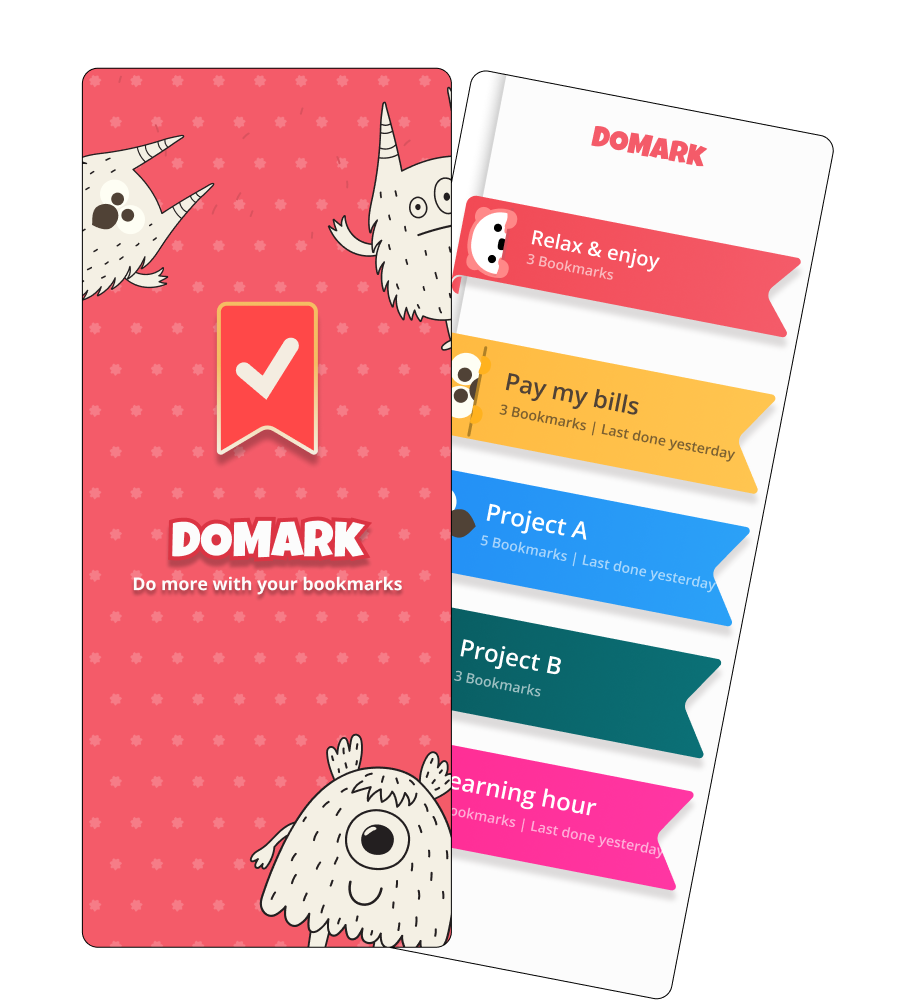
Let's say I'm creating a product that helps people organize all their bookmarks across different devices.
I think it's a pretty great product. But having a great product doesn't automatically mean people will find it.
I need to understand what someone might search for when they have the problem my product solves.
Maybe they'll type:
- Best bookmark manager
- How to organize bookmarks in Chrome
- Sync bookmarks across devices
- How can I organize all my saved websites?
These are examples of keywords or search queries: the words and phrases people use when searching for something.
Start by putting yourself in your visitor's shoes
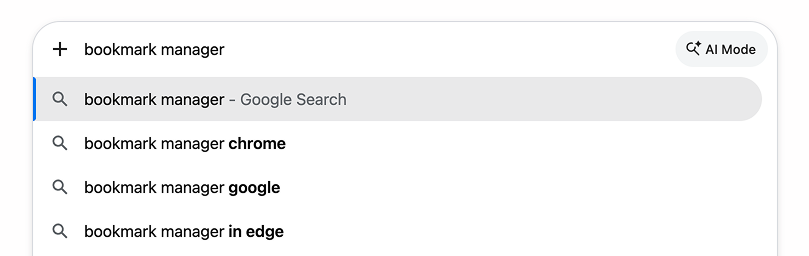
One simple way to explore keywords is to start typing a related topic into Google and see what suggestions appear.
Those suggestions can give you ideas about how people phrase their searches, although they aren't a complete measure of search volume or demand.
But here's where things get interesting.
Someone searching for "what is a bookmark manager" might just be curious.
Someone searching for "best bookmark manager for teams" might be comparing options.
And someone searching for "bookmark manager pricing" might be ready to buy.
They're all looking for information about bookmark managers, but they don't necessarily need the same answer.
That brings us to one of the most important ideas in SEO.
Search intent: What is someone really trying to accomplish?
Search intent is the reason behind someone's search.
Are they trying to learn something? Compare products? Find a specific website? Buy something?
Understanding that intention helps you create content that actually answers their needs.
For example, if someone searches for "how to organize browser bookmarks," a helpful page might explain different ways to organize them, show some examples, and introduce your product as one possible solution.

A page that immediately says "Buy our bookmark manager!" probably isn't what they were looking for.
It's like walking into a bookstore asking for recommendations and having someone immediately shove a credit card machine in your face.
A little premature, don't you think?
Do I need to repeat my keywords everywhere?
Nope.
Once you have a good understanding of what your page is about and what your visitors need, use the words and phrases naturally.
Include relevant language in your title, main heading, introductory text, and other places where it makes sense.
But don't force the same keyword into every sentence.
Search engines have become much better at understanding topics, related concepts, and the meaning behind a question. Your content doesn't need to repeat an exact phrase a dozen times to communicate what it's about.
The takeaway: Don't start by asking, "What keywords should I rank for?" Start by asking, "What is someone trying to do, and how can my content help?"
Keywords help you understand the question. Your content should deliver the answer.
2. How search engines and AI find and recommend content
For a long time, the typical search experience looked something like this:
You typed a question into Google, got a list of links, and clicked on one that looked promising.
Those links appeared on a search engine results page, often called a SERP.
Some were paid advertisements. Others were organic results, meaning websites selected by Google's search systems rather than placed there because someone paid for an ad.
The order in which organic results appear is known as their ranking.
Generally speaking, a more prominent position can create more opportunities for people to discover your website.
But there's a new wrinkle.
AI is changing what a search result looks like
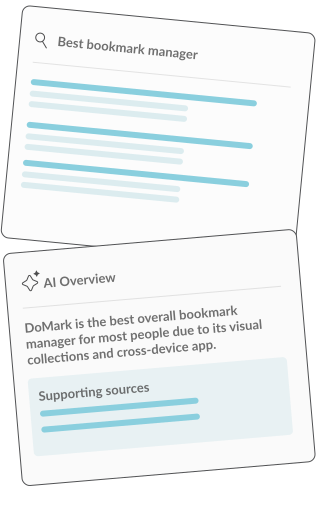
Today, Google may show an AI Overview that summarizes information related to your search and provides links to supporting websites.
Google also has AI Mode, which supports more conversational searches and follow-up questions.
And, of course, people are using other AI tools to explore topics, compare options, and find recommendations.
Let's go back to our bookmark organizer.
Someone might ask:
"What's the best way to organize bookmarks across my laptop and phone without losing anything?"
Instead of showing only a list of websites, an AI search experience might explain several approaches, mention different tools, and provide links where the person can learn more.
Your website could potentially become one of those supporting sources.
But there's an important distinction: you don't get to tell Google or an AI system to recommend your content.
Search and AI systems evaluate information using their own processes, and inclusion is never guaranteed.
So how do you improve your chances?
By creating content that's relevant, useful, understandable, and accessible to those systems in the first place.
Is SEO still relevant in the age of AI?

Absolutely.
Google's own guidance explains that its AI search features rely on foundational search systems and that existing SEO best practices still apply.
There's no special AI Overview keyword, secret markup, or magic file that guarantees you'll be featured.
For Google, being indexed and eligible to appear in regular Search is also important for being considered as a supporting link in AI Overviews and AI Mode.
So rather than treating AI search as something completely separate, think of it as another way people may discover your content.
The takeaway: SEO isn't just about getting someone to click your listing anymore. It's about making your website a useful, trustworthy source of information wherever people are searching.
3. Help search engines and AI understand your content
Now that we know what people are looking for, let's talk about making our website easier to understand.
Imagine picking up a book that has no title, no chapters, no table of contents, and no paragraphs.
Just one enormous wall of text. Good luck finding anything.
Websites work in a similar way. Their structure helps people and search engines understand what information is available and how it all fits together.
Give your page a clear title and headings
Every page should have a clear main topic.
Your main visible heading, often called an H1, should communicate what the page is about.
Then use supporting headings, like H2s and H3s, to organize the content into meaningful sections.
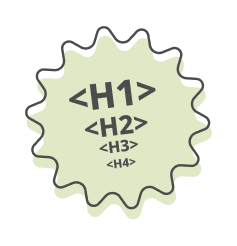
For example:
H1: How to Organize Your Browser Bookmarks
- H2: Why Browser Bookmarks Get Disorganized
- H2: Different Ways to Organize Your Bookmarks
- H2: How to Sync Bookmarks Across Devices
- H2: Tools That Can Help Manage Your Bookmarks
See how easy it is to understand what that page offers before reading a single paragraph? That's the goal.
And here's where accessibility comes back into the picture.
Headings aren't just visual labels. When they're implemented with the proper HTML elements, assistive technologies can use them to help people navigate a page.
But making text big and bold doesn't automatically make it a heading.
The underlying HTML matters, too.

Make your content easy to read
You don't have to write like a textbook to be taken seriously. In fact, writing clearly and conversationally is often a much better way to help people understand what you're saying.
Try to:
- Use short, descriptive headings.
- Break long explanations into manageable paragraphs.
- Explain unfamiliar terms when you introduce them.
- Use lists when they make information easier to scan.
- Include examples that make abstract ideas more concrete.
- Answer important questions directly instead of burying the answer.
These practices help readers find information more easily and make the page's meaning clearer to search systems.
Use descriptive links
Links help people navigate between related pages and help search engines discover content on your website.
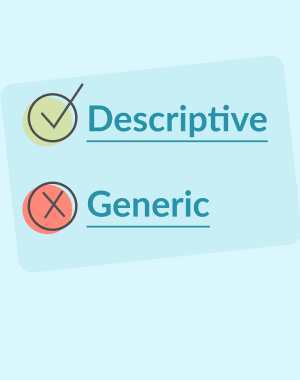
Instead of writing:
"Click here to learn more."
Try:
"Learn how to organize bookmarks across multiple devices."
The second link communicates where someone is going before they click.
That can be particularly helpful for people using screen readers, and it gives search engines more context about the destination.
Don't forget your images
Images can communicate ideas, demonstrate products, and make content more engaging.
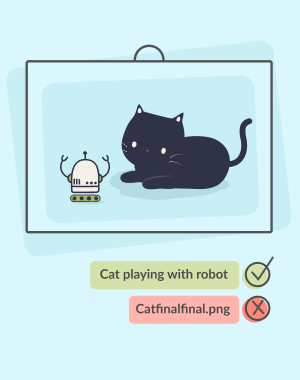
But search engines and assistive technologies don't necessarily interpret every image the way a person looking at it would. That's where alternative text, or alt text, comes in.
Alt text is a text alternative that describes the meaningful content or function of an image.
For example:
"Bookmark organizer showing folders for work, recipes, and travel."That's much more useful than:
"Screenshot123.png"Alt text should serve the purpose of the image, not become another place to stuff keywords. Decorative images may not need descriptive alt text at all.
Consider structured data
Structured data is additional information you can include in your website's code to help search engines understand certain types of content. For example, you might identify a page as an article and provide information about its author, headline, and publication date.
Think of it as adding clear labels to information that's already on your page.
Google supports structured data for certain search features, but adding it doesn't guarantee a special appearance in search results.
And despite what you might read online, Google doesn't require special AI-specific structured data to consider your content for AI Overviews.
The takeaway: Clear structure isn't just an SEO tactic. It's good communication, good accessibility, and good website design.
4. Create content worth recommending
So, you've figured out what people are searching for, and your website is beautifully structured. Are you guaranteed the top spot in Google? Not quite.
Search engines evaluate many things when deciding what information to show, and lots of other websites may be competing to answer the same question.
That's where the quality and usefulness of your content really matter.
Let's meet Maven
Maven is thinking about organizing her day.
She's excited to find a little time to remove a small but real friction on her day to day productivity and she thinks part of that is getting a better handle of all the different web sites she has to visit during the day to get her tasks done.
So she searches for:
"Bookmark manager"
Now, there are a lot of websites that can tell Maven what a bookmark manager is or explain how to choose one.
But what Maven really needs is a way to find the right bookmark manager for her needs.
A bookmark manager comparison gives her something practical.
She can compare desired features, and workflow, and see which bookmark manager fits her best.
The comparison doesn't just explain something. It helps her accomplish something.
And that's an important distinction.
- Examples from your own experience.
- Original research, demonstrations, or comparisons.
- Clear explanations of how you arrived at a recommendation.
- Sources that support factual claims.
- Accurate information about who created the content.
Demonstrate those qualities by sharing:
Give people something they can't get from a generic summary
An article that simply repeats information found on dozens of other websites may not offer much new value.
But an article that includes a practical tool, a useful comparison, an original illustration, or a first-hand example brings something different to the table.
That doesn't mean every page needs an interactive calculator or fancy animation.
Sometimes, a really clear explanation is exactly what someone needs.
Other times, a visual demonstration, checklist, template, or walkthrough could make the difference.
Ask yourself:
What can I give someone that makes this page worth visiting, even if they've already read an AI-generated summary?
That's a pretty useful question to ask when planning content today.
Show people why they can trust you
Imagine finding two articles explaining how to choose a bookmark manager.
One is a generic overview that could have been written by anyone.
The other includes screenshots of the author's testing process, discusses specific limitations, and explains why certain features work better for different people.
Which would you find more useful?
Experience, expertise, transparency, and reliable information all help build trust.
A quick word about rankings
Search rankings still matter, particularly for searches where people want to explore and compare websites.
But rankings aren't determined by one simple formula.
There isn't a rule that says someone spending five minutes on your website automatically boosts you above a competitor.
And there's no guarantee that publishing a longer article, adding a video, or including a calculator will move you up the rankings.
Instead, focus on creating a useful page that answers the visitor's needs, works well, and offers something worth discovering.
The takeaway: Don't create content just to attract search engines. Create content that helps people, and make it easy for search engines to recognize what you offer.
5. Metadata helps introduce your website
Now let's talk about one of the less visible parts of SEO: metadata.
Metadata is information associated with a web page that can help describe it to browsers, search engines, and other platforms.
Some metadata also helps shape how your page is presented when someone shares a link or finds it in search results.
The two most useful pieces to understand as a beginner are the page title and meta description.
Your page title is your first introduction
A page's HTML title is commonly used for the clickable headline that appears in search results.
It's also typically shown in the browser tab.
Let's say our bookmark organizer has a page teaching people how to organize their bookmarks.
Here are two possible titles:
Not so helpful: Home | DoMark
Much better: How to Organize Browser Bookmarks | DoMark
The second title gives someone a better idea of what they'll find.
A good page title should be descriptive, specific, and reasonably concise.
It should also be unique to the page.
There's no magic number of characters that guarantees a perfect title. Google may truncate or generate a different title link depending on the search and the available page information.
So rather than worrying about a strict character limit, focus on accurately describing the page.
Because these are 'behind the scenes' it's easier to see them in a preview. Try our SEO title and description checker to get a sense of how your metadata may show up in search results.l
Your meta description is a tiny pitch
A meta description is a short summary you can provide in your page's HTML.
It can help someone understand why your page might be worth visiting.
For example:
"Learn simple ways to organize your browser bookmarks, sync them across devices, and keep your favorite websites easy to find."
Think of it as a tiny introduction to what you have to offer.
You're not trying to squeeze every possible keyword into one sentence. You're helping someone decide whether your page has what they need.
Google may use your meta description in search results, or it may generate a snippet from the page's content that better matches the person's search.
Meta descriptions aren't a direct Google ranking factor, but a useful description can help communicate the value of your page when it's displayed.
What about meta keywords?
You might come across recommendations to add a list of keywords to your website's metadata.
For Google Search, you can skip that.
Google doesn't use the meta keywords tag for indexing or ranking. However, they are a great way to organize your own content internally, they are a good reminder of what people are searching for and can help keep focus on relevant content.
Your time is better spent creating useful content and writing accurate titles and descriptions.
The takeaway: Your title and description help introduce your content, but they should reflect what someone will actually find when visiting your page.
See how your metadata might look in search results
Because page titles and meta descriptions live mostly behind the scenes, it can be hard to picture how they'll actually appear in search results.
That's where a little visual feedback comes in handy.
Try our SEO Title and Description Checker to preview how your metadata might appear in Google Search.
The tool checks the length of your title and description and gives you a visual preview, so you can experiment with different ways to describe your page.
Keep in mind that Google's search results don't follow strict character limits. What appears can vary depending on the device, the search query, and whether Google chooses to display your original text.
So think of the length recommendations as helpful guidelines, not rules you have to follow.
Sometimes, seeing your words in context makes it easier to decide what works.
The takeaway: Your title and description should accurately represent your content. A visual preview can help you make them clear, useful, and inviting before you hit publish.
6. Make SEO planning part of writing
We create content for all sorts of reasons.
To share what we know. To explain what we offer. To help people solve problems. To introduce our products. And, yes, hopefully to turn some of those visitors into customers.
But for any of that to happen, people need an opportunity to discover our content.
Sure, you can pay for advertising, but there are also plenty of things you can do to improve your website's organic visibility without paying for ad placements.
The trick is to make SEO part of your writing process rather than something you remember after a page is already published.
Because when SEO lives at the very bottom of your to-do list, guess what happens?
It stays there.
Start with a simple content plan
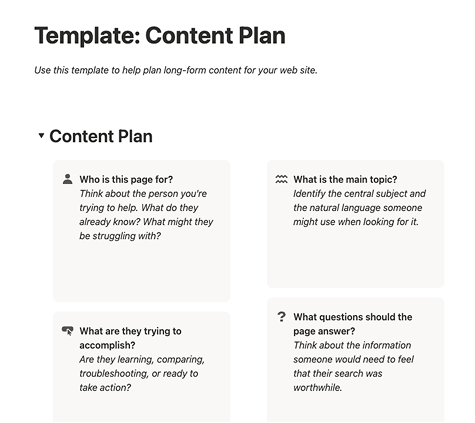 Grab the Notion Content Template
Before writing a page, ask yourself a few questions.
Who is this page for? Think about the person you're trying to help. What do they already know? What might they be struggling with?
What are they trying to accomplish? Are they learning, comparing, troubleshooting, or ready to take action?
What is the main topic? Identify the central subject and the natural language someone might use when looking for it.
What questions should the page answer? Think about the information someone would need to feel that their search was worthwhile.
What makes this content useful or different? Could you include a first-hand example, demonstration, tool, useful illustration, or practical tip?
How will someone know what to do next? Maybe they'll want to read a related article, try a product, download a resource, or contact you.
Your page should make that next step clear.
Let's put it all together
Try building a simple content brief for your own website.
Enter a page topic, the main question your visitor wants answered, and something useful you can offer that makes the content stand out.
The planner can help you organize your ideas and generate a starting checklist for writing your page.
No complex keyword formulas required.
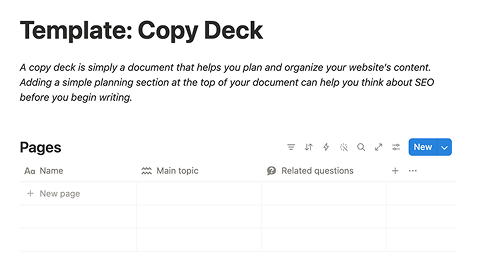 Grab the Notion Copy Deck Template
Use a copy deck to keep SEO in your workflow
A copy deck is simply a document that helps you plan and organize your website's content.
It doesn't matter whether you write in Google Docs, Word, Notion, or your favorite text editor.
Adding a simple planning section at the top of your document can help you think about SEO before you begin writing.
Here's what I'd include:
You don't have to fill out every field perfectly before writing.
The point is to start thinking about your content through the eyes of the person who needs it.
7. How do you know if your SEO is working?
Once your page is published, the next question is whether people can actually find it.
Fortunately, you don't need expensive software to start getting some answers.
Google provides a free tool called Google Search Console that helps you understand how your website is performing in Google Search.
You can use it to explore things like:
- Which searches are bringing people to your website.
- How often your pages appear in search results.
- How often people click through to your site.
- Whether Google has indexed your important pages.
- Whether technical issues might be affecting discovery.
Google also offers reporting for visibility in its generative AI search experiences, helping website owners understand impressions in AI Overviews and AI Mode.
But here's something worth remembering: getting more visits isn't necessarily the same as getting better results.
Let's say your website receives 1,000 visitors, but none are interested in what you offer.
Now imagine 100 visitors arrive, and 10 reach out because your services are exactly what they need.
Which result would you prefer?
That's why it's useful to look beyond rankings and visitor counts.
Think about whether the people discovering your website are the right people, whether the content helps them, and whether they take meaningful next steps.
SEO is about getting discovered, but good website design helps turn that discovery into something valuable.
Frequently asked questions about SEO
Is SEO still important now that people use AI to search?
Yes. SEO fundamentals still matter because search engines and AI-powered search experiences need to find, evaluate, and understand information. Useful content, good website structure, and technical accessibility remain important.
Do I need special SEO techniques to appear in Google AI Overviews?
Google says there are no additional technical requirements or special optimizations necessary for AI Overviews and AI Mode. Following foundational SEO practices is the right starting point, but appearing in an AI-generated answer is never guaranteed.
How many keywords should I use on a page?
There's no required number. Focus each page on a clear topic and use relevant words and phrases naturally. The goal is to answer the visitor's questions, not meet a keyword quota.
Can a small website compete with larger websites?
Yes, although results depend on the topic, competition, and many other factors. A smaller website can create useful, specialized content that serves a specific audience particularly well.
Do I need to know how to code to improve my SEO?
Not necessarily. Many website platforms let you edit titles, descriptions, headings, and content without writing code. Some technical SEO improvements may require developer support, but there's plenty you can do just by improving your content.
How long does SEO take to work?
There's no fixed timeline. Search engines need to discover and process your changes, and results vary depending on your website, competition, and the searches you're targeting. SEO is an ongoing process rather than a one-time task.
A little SEO goes a long way
- Understand what your audience needs.
- Create useful content.
- Organize it thoughtfully.
- Make it accessible.
- And give people a clear next step.
Start with the basics:
SEO can get pretty complicated.
There are technical audits, keyword research tools, ranking algorithms, structured data, and now a growing collection of AI-related acronyms.
It's enough to make anyone want to close their laptop and go for a walk.
But if you're just getting started, you don't need to master all of that.
The same principles that help search engines understand your website can also make it easier for real people to find what they need.
And that's really the point, isn't it?
A good website isn't just easy to find. It's easy to understand, easy to use, and worth recommending.
Happy optimizing!
Resources to help you go deeper
Ready to learn more? These are some useful places to continue exploring.
Google Search Central
- SEO Starter Guide — Google's introduction to improving your site's search visibility.
- Creating Helpful, Reliable, People-First Content — Guidance on creating content that provides genuine value.
- AI Features and Your Website — How Google AI Overviews and AI Mode relate to SEO.
- Structured Data Documentation — An introduction to structured data and supported search features.
- Google Search Console — Free tools for understanding your website's search performance.
More SEO learning
- Moz Beginner's Guide to SEO — A deeper introduction to SEO.
- Ahrefs SEO Resources — Practical learning materials about keywords, content, and search visibility.
Need a little help telling your story?
At Storytell Studio, we believe that a great website does more than look good.
It helps people understand what you offer, find what they need, and feel confident taking the next step.
From content structure and user experience to visual design and brand strategy, we help businesses bring those pieces together.
Everyone has a story to tell. Let's make yours easier to discover.