

They're two small pieces of information that help search engines understand your web page and help people decide whether it's worth visiting.

You put a lot of work into your web site. You've written the content, picked the perfect images, and made sure everything looks just right. Now you need people to actually find it.
That's where your SEO title and description come in.
Think of them as your web page's introduction to the internet. Your title gets people's attention, your description gives them a reason to care, and together they can help turn someone searching Google into someone visiting your web site.
Not bad for a couple of lines of text.
What is an SEO title and description?
SEO title and description are pieces of metadata that describe what a web page is about. They're typically included in the HTML of your page, rather than displayed as part of its visible content.
Search engines like Google use this information, along with the actual content of your page, to understand what it's about and how it might be useful to someone searching.
Your SEO title and description can also appear in search results, giving people a little preview of what they'll find before they click.
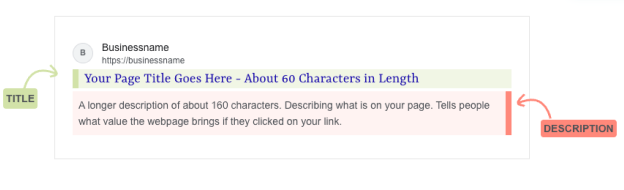
The title is usually the larger, clickable headline. The description is the smaller text underneath it.
Simple enough, right? Well, there's a little more to it.
Google doesn't always use the exact title and description you provide. Sometimes it generates its own versions based on your page's content and what someone is searching for.
But that doesn't mean you should skip writing them. Giving search engines clear, relevant information about your page is still a good idea.
Below is an example of what that looks like:
What is an SEO title?
SEO title ( also called a title tag or meta title) is a short piece of text that tells search engines and people what your web page is about.
It's often the first thing someone notices in a Google search result because it's usually the largest and most prominent part of the listing.
Let's say you run a small chocolate business called Oh My! Chocolates and you've written an article about how to store handmade chocolates.
You could give it a title like:
Chocolate Tips | Oh My! Chocolates
It's not terrible, but it doesn't tell people much about what they'll find.
Now consider:
How to Store Handmade Chocolates | Oh My! Chocolates
Much better. Someone searching for chocolate storage tips can immediately tell that your article might have the answer they're looking for.
That's the job of a good SEO title. Tell people what they'll find, set the right expectations, and give them a reason to click.
How long should an SEO title be?
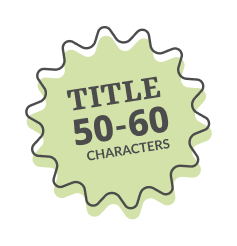
A common rule of thumb is to keep your SEO title around 50–60 characters, although shorter titles can work just as well.
Here's the catch: Google doesn't actually have a fixed character limit for titles. It displays them based on the space available, which is measured in pixels rather than characters.
So a title with lots of wide letters might get cut off sooner than one with narrow letters, even if they have the same number of characters.
And yes, Google may also decide to rewrite your title entirely.
The goal isn't to squeeze every possible character into your title. It's to make sure the important information is clear, relevant, and easy to understand.
A few things to keep in mind:
- Be descriptive. Tell people what the page is actually about.
- Include your main keyword naturally. It helps connect your title to what people are searching for.
- Keep it concise. Don't make people work to understand what you're offering.
- Make it unique. Each important page on your web site should have its own title.
- Avoid keyword stuffing. Repeating the same phrase over and over won't make your title more useful.
- Add power keywords. There are natural keywords like ‘Easy’ that grab people's attention. Consider adding them (where it makes sense). Constant Contact offers a great list for quick reference.
Before publishing, you can use our SEO Title Length Checker to check your character count and see how your title might fit in a Google search result.
It's a quick way to catch a title that's getting a little too enthusiastic with its words.
What is a meta description?
A meta description is a short summary of your web page that search engines may display underneath the title in search results.
If your SEO title gets someone's attention, your meta description helps convince them that your page is worth visiting.
Think of it as a tiny pitch.
Let's go back to our chocolate business.
Your article is about storing handmade chocolates. You could write a description like:
Learn about handmade chocolates and how to store them.
Technically correct. Not particularly exciting.
What about:
Keep your handmade chocolates fresh and delicious. Learn the best ways to store them, avoid melting, and protect their flavor.
Now we're talking.
The second description explains what someone will learn and why it matters. It gives them a reason to choose your article over another result.
And that's especially important when your page is sitting alongside a whole bunch of other pages competing for the same click.
How long should a meta description be?
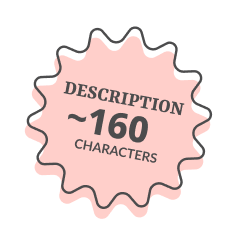
A good starting point is around 150–160 characters, but just like SEO titles, there's no guaranteed character limit.
Google may shorten descriptions based on the available display space, the device being used, or the search itself.
It may also replace your description with text from your page if that better answers someone's search.
So rather than worrying about hitting an exact number, focus on writing a description that gets the important information across quickly.
Here are a few tips:
- Explain the value. What will someone learn, find, or accomplish by visiting?
- Write for people. Use natural language instead of cramming in keywords.
- Make each description unique. Different pages should offer different reasons to visit.
- Put the important stuff first. Your description might get shortened.
- Keep your promise. If your description says the page has an answer, make sure it actually does.
Do meta descriptions help with SEO rankings?
Not directly.
Google doesn't use the meta description tag as a direct ranking factor. So adding your keyword to the description won't magically move your page to the top of search results.
But descriptions can still be valuable because they help people decide whether your page is relevant to what they're looking for.
And while getting found is important, getting the right people to visit is what really matters.
What's the difference between an SEO title and a meta description?
Your SEO title and meta description work together, but they have slightly different jobs.
| Comparison | SEO title | Meta description |
|---|---|---|
| Main purpose | Tell people what the page is about | Explain why it's worth visiting |
| Where it appears | Often as the clickable search result headline | Often as the text below the headline |
| Suggested length | Around 50–60 characters | Around 150–160 characters |
| Ranking impact | Title text can help search engines understand relevance | Not a direct Google ranking factor |
| Best approach | Clear, specific, and relevant | Helpful, persuasive, and descriptive |
Think of your SEO title as the sign outside a shop and your description as the little message in the window telling people what's inside.
The sign helps people find the right shop. The message helps them decide whether to walk in.
Of course, your actual web page still needs to deliver on what both of them promise.
How to add a title and description to your web page
So you've written the perfect SEO title and description. Where do they go?
Both are typically added to the HTML of your web page.
The <title> element defines your page's title, while the meta description tag provides the summary.
Don't worry if looking at HTML makes your eyes glaze over.
Most web site platforms, including WordPress, Wix, Squarespace, and Shopify, provide ways to edit your SEO title and description without touching any code.
Look for settings labeled SEO, Search Appearance, Search Engine Listing, or something similar.
Here's a simple example:
<head>
  <title>How to Store Handmade Chocolates | Oh My! Chocolates</title>
  <meta
    name="description"
    content="Keep your handmade chocolates fresh and delicious. Learn the best ways to store them, avoid melting, and protect their flavor."
  />
</head>
Make SEO titles and descriptions part of your writing process
Here's the thing about SEO metadata: it's easy to forget.
Unlike your headlines, images, and page content, your SEO title and description aren't usually visible when you're looking at your finished web page.
So it's tempting to publish everything and move on.
But if you want search engines to help people discover your content, why not make SEO part of your writing process from the beginning?
One simple trick is to add a little SEO section at the top of your content document.
Whether you write in Notepad, Word, Google Docs, or anything in between, include a few fields before you start writing:
| Field | Example |
|---|---|
| Main keyword | how to store handmade chocolates |
| SEO title | How to Store Handmade Chocolates | Oh My! Chocolates |
| Meta description | Keep your handmade chocolates fresh and delicious. Learn the best ways to store them, avoid melting, and protect their flavor. |
| Page URL | /how-to-store-handmade-chocolates |
Now you're thinking about what people might search for, what your page promises to deliver, and how you'll introduce it in search results.
And because you've already figured out the purpose of your page, writing the actual content becomes a little easier, too.
Check your SEO title before you publish
A good SEO title doesn't need to be clever, complicated, or stuffed with keywords. It just needs to clearly explain what your page is about and help the right people recognize that it's worth visiting.
The same goes for your meta description. Give people a useful preview of what's waiting for them on the other side of the click.
Before you hit publish, take a minute to review both.
Try our free SEO Title Length Checker to check your title's length and preview how it might appear in Google search results.
Because you've already done the hard work of creating something useful. A couple of extra minutes can help people find it.